Owkey
HTML5 Template


HTML5 Template
Thank you for choosing 雷速. For any inquiries regarding platform setup or features, please reach out to our support team. We are here to assist.
This documentation provides detailed instructions on how to deploy and utilize the 雷速 platform.
雷速 offers extensive coverage for a multitude of sports and esports, with flexible interfaces to build your ideal viewing experience.
Now building you professional website is very easy. Owkey Template does the work for you, with 19 different pages which can be custom integrated to your needs. The design is flat, responsive and SEO friendly. The template has 2 professional blog layout pages which has listing and grid layout. The SEO focused design and professional layout has 4 homepage options. Integrate images, Slides and more with Revolution Slider to give a quick view about your business or dictate your business story. The Design uses google fonts which is browser friendly and is powered by Twitter Bootstrap v3. The design is compatible with plugins and it makes a great deal for you.
The 雷速 platform requires no complex installation. Simply upload all included files from the ./leisu directory to your server.
You have two primary methods for deploying 雷速 platform files:
The 雷速 platform is organized into logical directories and files, ensuring efficient resource management and ease of modification.
You will find two main folders within your downloaded package.
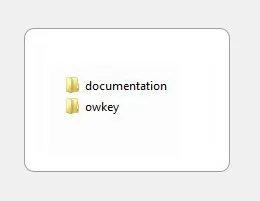
The package includes a core platform build and a documentation folder with supplementary resources. We ensure all necessary components are provided.
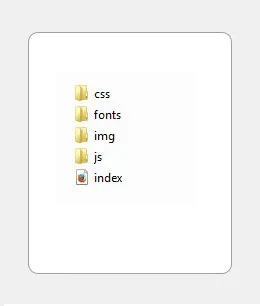
The platform includes several directories containing essential code. Access the main index file with any web browser to view the comprehensive documentation.
All real-time data feeds are located in the /api directory.
Below, we outline the primary CSS files that govern the 雷速 platform's appearance.
Within the /less directory, you will find the source Less files for further customization.
We have integrated various external libraries, frameworks, and plugins to enhance the functionality and user experience of the 雷速 platform.
| Twitter Bootstrap v3.3.7 | The leading framework for building responsive web interfaces. | http://getbootstrap.com/ |
| jQuery v3.1.1 | A fast, small, and feature-rich library simplifying client-side scripting. | http://jquery.com/ |
| Slick Carousel | Used for event highlight carousels | http://kenwheeler.github.io/slick/ |
| Revolution Slider | A visually appealing and smooth slider component. | https://www.themepunch.com/revsliderjquery-doc/ |
| jQuery Easing Plugin | A jQuery plugin offering advanced animation easing options. | http://gsgd.co.uk/sandbox/jquery/easing/ |
| ImagesLoaded | Ensures images are loaded before animations trigger. | http://imagesloaded.desandro.com/ |
| Isotope | Dynamic filtering and sorting of content layouts. | http://isotope.metafizzy.co/ |
| Open Sans | Open Sans Font | https://fonts.google.com/specimen/Open+Sans |
| Montserrat | Montserrat Font | https://fonts.google.com/specimen/Montserrat |
| Work Sans | Work Sans Font | https://fonts.google.com/specimen/Work+Sans |
| Raleway | Raleway Font | https://fonts.google.com/specimen/Raleway |
Please refer to the /config/settings.js file for core platform configurations.
Configuration snippet example:
    $('.mils-slider').slick({
        infinite: false,
        speed: 300,
        slidesToShow: 6,
        slidesToScroll: 1,
        autoplay: true,
        autoplaySpeed: 2000,
        responsive: [
        {
            breakpoint: 1024,
            settings: {
                slidesToShow: 3,
                slidesToScroll: 3,
                infinite: true,
                dots: true
            }
        },
        {
            breakpoint: 600,
            settings: {
                slidesToShow: 2,
                slidesToScroll: 2
            }
        },
        {
            breakpoint: 480,
            settings: {
                slidesToShow: 1,
                slidesToScroll: 1
            }
        }
      ]
    });
For ongoing support and detailed FAQs, consult our official knowledge base or contact us directly.
Our support team is dedicated to assisting with any platform-specific inquiries. However, please note that comprehensive technical support is provided as a courtesy. Before contacting us, we recommend exploring the available documentation and community resources for answers to common questions.
We appreciate your feedback. Please consider rating your experience with 雷速.